End of Year Games Game Show Fun Friday Activities Countdown to Summer Activities
$3.00
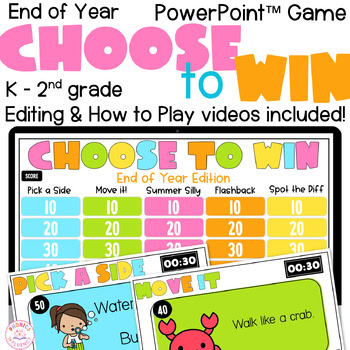
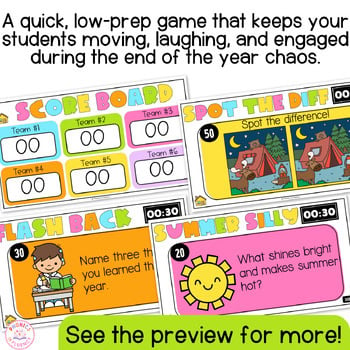
The Ultimate End of Year Game for those wild last days of school! Make your End of Year Activities fun with this interactive Game Show packed with movement, silly summer fun, classroom memories, and fast-paced challenges your students will beg to play again and again.
The Ultimate End of Year Game for those wild last days of school! Make your End of Year Activities fun with this interactive Game Show packed with movement, silly summer fun, classroom memories, and fast-paced challenges your students will beg to play again and again.
Do you need something fun to fill those awkward end of year moments without losing complete control of your classroom? Are your students bouncing off the walls counting down to summer break?
This game is a fun, low-prep way to keep your Kindergarten, 1st grade, and 2nd grade students engaged while still keeping your classroom structured and manageable during the chaos of the End of Year season.
How to Play
- Divide students into teams.
- Choose one team to go first.
- That team picks a category and point value.
- Click the chosen box on the game board.
- Read the challenge or question aloud.
- Have all teams participate in the challenge.
- For question-style cards, let teams write or draw their answers on whiteboards.
- Check with the team that chose the card first.
- Then quickly check with the other teams to see what they chose, wrote, drew, or noticed.
- Award points to the team that chose the card.
- Return to the game board and continue playing.
How Points Work
The team that chooses the card earns the points, but the whole class still participates.
You can award points for:
- participation
- effort
- creativity
- teamwork
- correct answers
Category Notes
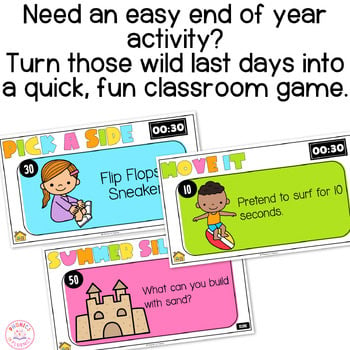
For Pick a Side cards:
- All students choose a side.
- The team that picked the card shares first.
- Then quickly let other teams share their choices.
For Move It cards:
- The whole class completes the movement.
- Award the points to the team that chose the card.
For Summer Silly cards:
- Let all teams think, write, or draw their answer.
- Check with the team that chose the card first.
- Then ask a few other teams to share.
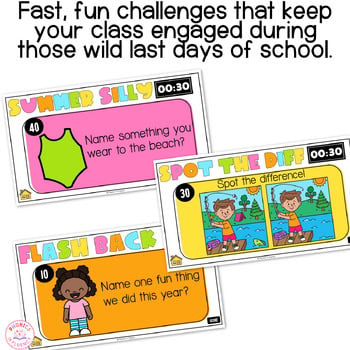
For Flashback cards:
- Let all teams think, write, or draw their response.
- The team that chose the card shares first.
- Then invite a few other teams to share their memories.
For Spot the Difference cards:
- Let all teams look for the differences.
- Check with the team that chose the card first.
- Then let other teams add anything they noticed.
The goal is simple: keep students engaged, laughing, and involved during the busy last days of school.
This End of Year Game Show is a must-have for:
✔ Fun Friday activities
✔ Countdown to Summer activities
✔ End of Year classroom games
✔ Brain breaks
✔ Indoor recess
✔ Reward days
✔ Morning meeting games
✔ Fast finisher activities
This resource is a classroom favorite because it will:
★ Keep students engaged with quick challenges, movement activities, riddles, and interactive games.
★ Turn those long end of year days into something fun, structured, and easy to manage.
★ Build classroom community through whole-class participation and team play.
★ Save you valuable prep time with a ready-to-go PowerPoint game that is easy to set up and play.
🛑 IMPORTANT: This is a PowerPoint Game Show and will not work correctly in Google Slides due to the automatic scoring features.
►► WHAT’S INCLUDED:
✔ Interactive PowerPoint Game Show with clickable navigation
✔ Automatic scoring system
✔ 30-second timer on each challenge slide
✔ 25+ ready-to-play challenges and activities
✔ Fully editable text so you can customize the game for your classroom
✔ Moveable clipart
✔ Editing & How-To-Play videos included
►► 5 FUN CATEGORIES INCLUDED:
☀ Pick a Side
☀ Move It!
☀ Summer Silly
☀ Classroom Flashback
☀ Spot the Difference
►► PERFECT FOR:
✔ End of Year Activities
✔ Countdown to Summer
✔ Fun Friday
✔ Indoor Recess
✔ Brain Breaks
✔ Reward Parties
✔ Whole Class Games
✔ Morning Meeting Activities
✔ Fast Finishers
✔ End of Year Classroom Management Support
Thanks for being here.
If this works well in your classroom, a review helps another teacher find it.
See something that needs fixing? Email me at ki***@**************cy.com and I will take care of it.
Kisha
Reviews
There are no reviews yet.